GPA calculator
Calculate a general grade-point average from course grades and credits.

Vel Tech semester planning
Use this veltech cgpa calculator to combine semester SGPAs and credits under a named regulation. It is independent, local, and available without a login.
Your entries stay in this browser. Verify every result against your official record.
Choose the named regulation shown on your official record. Custom mode does not convert percentage.
Build one term with up to 20 courses. RA, AB, or WH cannot transfer automatically.
— SGPA · 0 valid credits
Calculate a current CGPA first.
Weighted semesters
Choose B.Tech 2025, B.Tech 2013, or Custom GPA-only, then enter each semester label, SGPA, and registered credits. The calculation multiplies every valid SGPA by its credits, adds the weighted points, and divides that total by all included credits. Credits matter: a simple average can be misleading when terms have different loads.
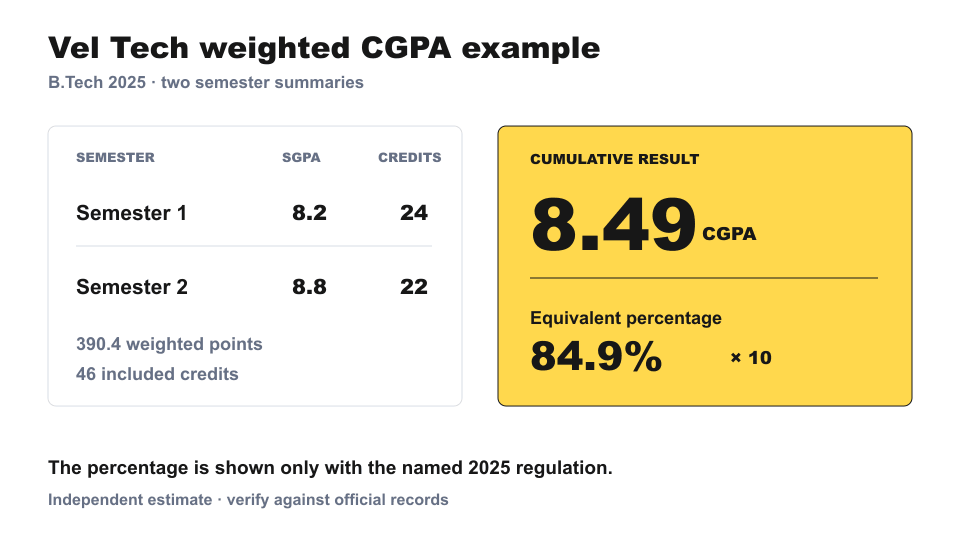
For example, 8.2 SGPA across 24 credits and 8.8 across 22 credits produces 390.4 weighted points over 46 credits. The credit-weighted result is 8.49 CGPA. The result panel keeps this primary number separate from the supporting totals, selected regulation, percentage reference, and semester contribution trace.
The calculator accepts up to 12 semesters and reports incomplete rows, SGPA outside 0–10, non-positive credits, or credits above the row limit. It does not silently discard uncertain entries or display an invented result. Use the example to see the flow, edit its values, or reset everything for your own record.
Course bridge
Open the secondary course builder when you have course grades but not a semester SGPA. Add up to 20 courses, choose each grade or status, and enter its credits. The tool calculates grade points × course credits and divides their sum by the included credits.
B.Tech 2025 uses O, A+, A, B+, B, C, and RA. B.Tech 2013 uses S, A, B, C, D, and RA; AB and WH remain unresolved instead of receiving invented numeric values. Custom GPA-only mode does not claim an official course-grade mapping.
A clean passing result can transfer into the semester table. If RA, AB, or WH makes that transfer ambiguous, use the SGPA and credits printed on your official grade sheet. The builder is a bounded convenience, not a prediction of arrears, eligibility, replacement policy, or credit completion.
Named rules
Vel Tech publishes more than one academic regulation, so the veltech cgpa calculator does not infer your rules from admission year alone. Select the regulation named on your programme document or grade sheet, then verify it through the university's academic regulations index.
For the published B.Tech 2025 regulation, the equivalent percentage shown here is CGPA × 10. For the published B.Tech 2013 regulation, it is CGPA × 9. These sources were checked on October 28, 2026.
Custom GPA-only still computes a credit-weighted result, but deliberately omits a percentage and official grade map. That is safer than applying one multiplier to every programme. Displayed results are rounded for readability after full-precision intermediate calculations.
One target
The target planner asks what next-semester SGPA would reach a chosen cumulative target after a chosen number of future credits. It uses current weighted points and credits, then labels the outcome as already met, reachable, exactly 10.0, or unreachable above 10.0.
The worked 8.49 record cannot reach 9.5 in one 20-credit semester because it would require an SGPA above 10. The planner shows that boundary instead of clamping it to a plausible-looking value. It does not predict offered credits, repeat-course treatment, eligibility, or a university decision.
Bounded comparison
Scenario B clones the current semester plan once. Change a known value and compare the alternate CGPA with Scenario A without overwriting the main inputs. The signed delta makes the difference visible, while a single alternate keeps the workflow focused and calculations bounded.
Do not treat this as an “RA if cleared” forecast. The tool never assumes a future passing grade, replacement policy, or credit treatment that is not established by your official record and applicable regulation.
Portable estimate
Copy Summary creates readable text with the regulation, semester values, CGPA, and totals. Copy Share Link creates a versioned URL that restores semester inputs, target settings, and Scenario B. Those summary values appear in the URL, so review it before sharing. Course-builder drafts are intentionally excluded.
Text Report is designed for notes; CSV Export is structured for a spreadsheet. Both are generated locally from your calculation rather than from a screenshot or decorative page frame. Nothing is uploaded, no account is created, and GradeCal keeps no cloud history.
Before relying on an estimate, compare labels, credits, SGPA values, and the selected rule with your official documents. For another grading scale, use the GPA calculator. To combine general term GPAs, try the cumulative GPA calculator, or return to the GradeCal grade calculator.
Example output
The example shows how 8.2 × 24 credits and 8.8 × 22 credits produce 8.49 CGPA and a 2025 reference percentage of 84.9%.
Related calculators
Return to the GradeCal grade calculator for weighted course grades and final targets.
FAQ
SGPA summarizes one semester's credit-weighted course performance. CGPA combines multiple semesters and weights each semester by its included credits. The calculator supports both workflows but keeps cumulative CGPA as the primary result.
Use the conversion stated by the regulation that applies to your programme. The published 2025 B.Tech rules use CGPA × 10, while the published 2013 B.Tech rules use CGPA × 9. Custom mode deliberately shows no conversion.
No. The veltech cgpa calculator is an independent GradeCal planning tool and is not affiliated with or endorsed by Vel Tech. It does not replace a transcript, grade sheet, academic regulation, or university advice.
RA remains visible where it appears in the selected scale, but the tool never predicts a later passing grade. In the 2013 course workflow, AB and WH remain unresolved and block automatic transfer. Enter the official semester SGPA when treatment is uncertain.
A simple average gives every semester equal influence. This calculator weights each SGPA by its included credits and rounds the displayed result only after using full-precision intermediate values.
Yes. A valid versioned link restores the regulation, semester rows, target inputs, and one comparison scenario. Course drafts are excluded, and anyone with the URL can read the summary values it contains.